Shogi
A downloadable shogi for Windows
# Shogi Game - How to Operate and Play (shogi_game.exe version)
## Overview
This is a Shogi (Japanese chess) application for playing against a CPU opponent.
## How to Operate
### Launching the Game
- Double-click the `shogi_game.exe` file.
- The game will automatically start in "Human (You) vs. CPU" mode. You will play as Sente (Black, the first player).
### In-Game Controls
- **Moving a Piece**:
1. Click on one of your pieces on the board to select it. (It will be highlighted with a blue square).
2. Click on the destination square.
- **Dropping a Piece**:
1. Click on a captured piece you own from your hand area, located at the bottom of the screen.
2. Click on an empty square on the board where you want to place it.
- **Promotion**:
- When a piece can be promoted, a dialog box will appear asking "成りますか?" (Promote?).
- Click the "はい" (Yes) or "いいえ" (No) button to make your choice.
- **Ending and Restarting the Game**:
- When a checkmate ("詰み") occurs or a king is captured, a dialog will appear announcing the winner.
- Click the "OK" button to reset the board and start a new game.
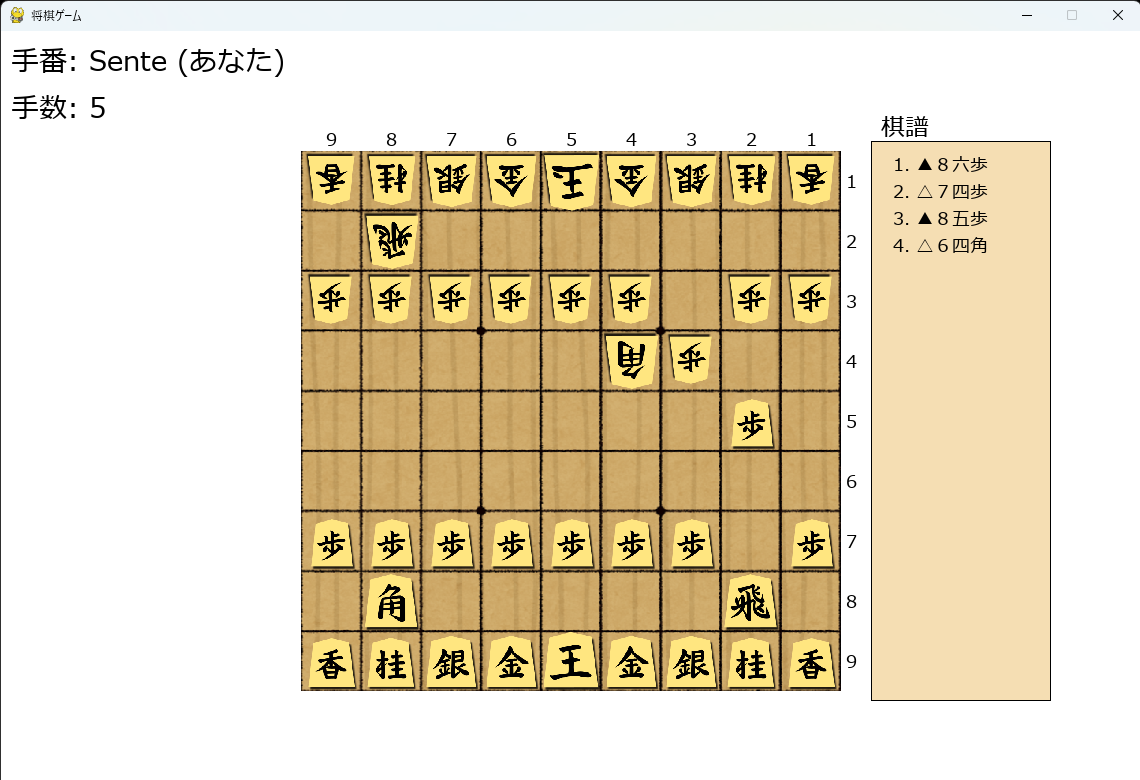
## Screen Layout
- **Shogi Board**: Displayed in the center of the screen.
- **Captured Pieces (Hand)**:
- **Sente (Your pieces)**: Displayed at the bottom of the screen.
- **Gote (Opponent's pieces)**: Displayed at the top of the screen.
- **Turn Information**: The current player's turn (Sente/Gote) and the move count are shown in the top-left corner.
- **CPU Thinking Indicator**: When the CPU is thinking, a message "CPU思考中..." (CPU thinking...) with a timer will appear at the bottom center of the screen.
- **Kifu (Game Record)**: A record of all moves made is displayed on the right side of the screen.
# 将棋ゲーム 操作・プレイ方法 (shogi_game.exe版)
## 概要
このアプリケーションは、将棋をプレイするためのものです。人間対CPUの対戦が楽しめます。
## 操作方法
### 起動
- `shogi_game.exe` をダブルクリックして実行します。
- ゲームは自動的に「人間(あなた)が先手」対「CPUが後手」のモードで開始されます。
### ゲーム中の操作
- **駒の移動**:
1. 動かしたい自分の駒をクリックして選択します。(選択されると青い枠でハイライトされます)
2. 移動させたい先のマスをクリックします。
- **持ち駒を打つ**:
1. 画面下部にある自分の持ち駒をクリックして選択します。
2. 盤上の打ちたいマスをクリックします。
- **成り/不成の選択**:
- 駒が成れる場面では、「成りますか?」というダイアログが表示されます。
- 「はい」または「いいえ」ボタンをクリックして選択してください。
- **ゲームの終了と再開**:
- 「詰み」または「王が取られた」��合、勝敗を示すダイアログが表示されます。
- 「OK」ボタンをクリックすると、盤面がリセットされ、新しいゲームが開始されます。
## 画面の見方
- **将棋盤**: 画面中央に表示されます。
- **持ち駒**:
- **先手(あなた)**: 画面下部に表示されます。
- **後手(相手)**: 画面上部に表示されます。
- **手番情報**: 画面左上に、現在の手番(先手/後手)と手数が表示されます。
- **CPU思考中表示**: CPUの思考中は、画面下部中央に「CPU思考中...」というメッセージと経過秒数が表示されます。
- **棋譜**: 画面右側に、これまでの指し手が棋譜として表示されます。
---
Download
Leave a comment
Log in with itch.io to leave a comment.